Your raw footage is your most valuable intellectual property. Yet, every time you hit upload, you surrender your media sovereignty to a corporation's opaque EULA. You're rightfully tired of slow 4K transfer speeds and forced cloud subscriptions that treat your assets like a commodity. Finding the best private video editing software isn't just a technical choice. It's a refusal to compromise on digital rights. You need tools that work for you, not for a data-hungry server farm.
Stop uploading your life's work to the cloud. You can achieve a zero-upload workflow that keeps your media local, secure, and verifiable. We'll show you how to leverage professional-grade AI assistance while maintaining total ownership of your raw assets. This breakdown explores the high-performance world of local-first processing. We compare the privacy architecture of AetherCut against industry heavyweights like DaVinci Resolve 21 and Final Cut Pro 11. It's time to demand a new standard of user autonomy and technical truth. Your media belongs on your machine.
Key Takeaways
- Expose the cloud trap. Learn to distinguish between genuine zero-upload architecture and deceptive "privacy-first" marketing fluff.
- Identify the best private video editing software by verifying that all AI processing occurs locally on your NPU or GPU.
- Audit your network activity. Discover how to monitor background telemetry to ensure your raw assets never leave your device.
- Reclaim media sovereignty. Eliminate mandatory cloud logins and keep your high-resolution footage under your total physical control.
- Scale your workflow without risk. Deploy professional-grade AI tools that prioritize technical truth over corporate data collection.
Why Most 'Private' Video Editing Software is a Myth in 2026
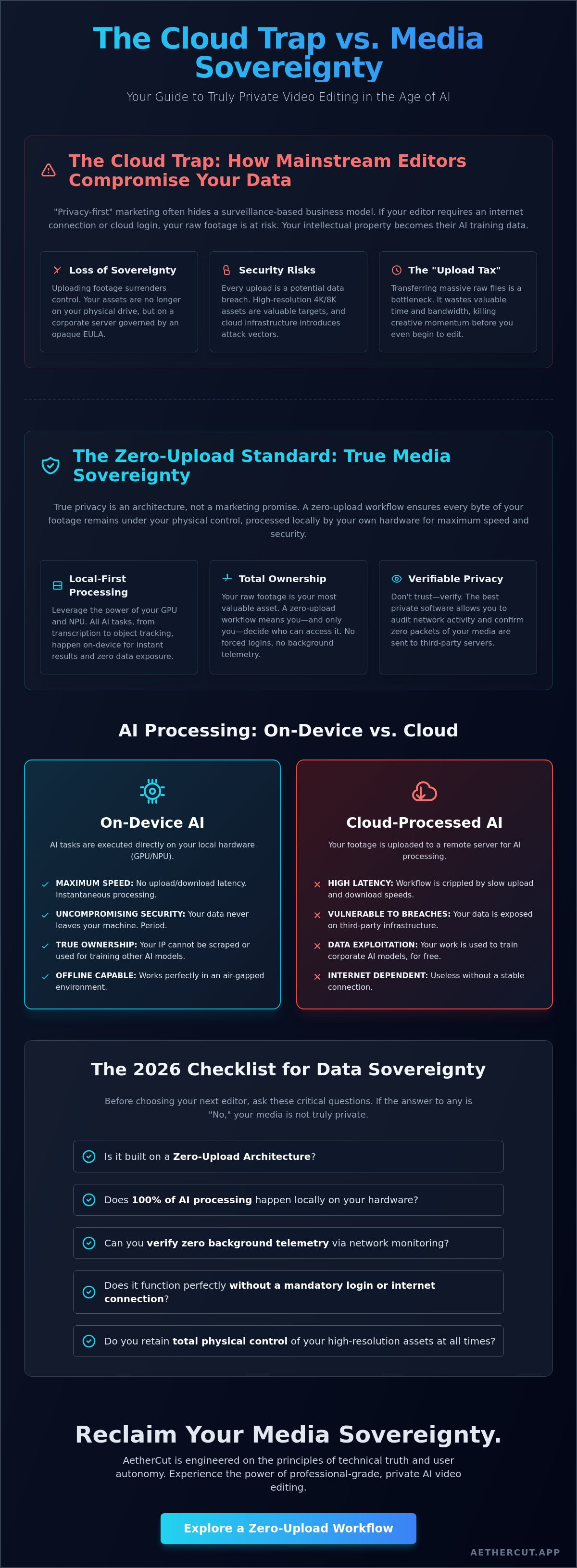
The industry is lying to you. In 2026, "privacy" has become a hollow marketing tag used to sell the same old surveillance. True privacy isn't a checkbox buried in a settings menu. It's an architecture. It requires a zero-upload, zero-telemetry workflow where not a single byte of your footage leaves your machine. If your editor requires a login to function, it isn't private. It's a tracking device. Mainstream Video editing software giants have set a "Cloud Trap." They want your raw assets to train their next generation of generative AI models. Your intellectual property is their free training data. This isn't a conspiracy; it's a business model hidden in the fine print of your EULA.
To find the best private video editing software, you must look past the marketing fluff. You need a tool that treats your media as sovereign property. True media sovereignty stands on three pillars. It must be local; all processing happens on your own GPU or NPU. It must be private; there are no forced cloud subscriptions or data-sharing clauses. Finally, it must be verifiable. You should be able to monitor your network traffic and see exactly zero packets sent to a third-party server. AetherCut was built on these principles, refusing to compromise on technical truth or engineering integrity.
The Problem with Cloud-Based AI Editors
Every upload is a security breach waiting to happen. Moving 4K or 8K raw assets to a server farm is slow, expensive, and fundamentally dangerous. Mainstream editors claim their cloud AI is "faster," but they ignore the latency of the upload. More importantly, they ignore the risk. Once your footage is on their server, you've lost control. Browser-based platforms often offer an "illusion of control" while scraping your metadata in the background. If you can't edit without an internet connection, you aren't the owner; you're a tenant. The best private video editing software eliminates this dependency entirely.
Data Sovereignty: Who Actually Owns Your Raw Footage?
Terms of Service are a flimsy shield against corporate interests. For journalists protecting sources or corporate legal teams handling sensitive internal assets, the cloud is a non-starter. Legal implications for data leaks are massive. This has sparked a radical shift toward local-first software in highly regulated industries. They don't want promises; they want verifiable code. They need an environment where the "delete" key actually removes the data from the only place it ever existed: their own hard drive. Real sovereignty means the software works for you, not the other way around. It's about total ownership of every frame you capture.
The Zero-Upload Standard: How Local AI Redefines Media Sovereignty
The cloud is a bottleneck. It's a security hole. It's an unnecessary middleman between your vision and your final render. For years, software giants claimed that professional AI required massive server clusters. They were wrong. In 2026, the "Zero-Upload Standard" has arrived. This architecture ensures that your footage stays where it belongs: on your local drives. By leveraging the immense power of modern silicon, the best private video editing software now matches cloud performance without the inherent risks of data exposure. You no longer have to choose between advanced features and media sovereignty. You can have both.
Mainstream "Privacy-First" marketing is often a facade. These companies offer settings to "opt-out" of data sharing, yet their software still requires a persistent connection. True privacy is built into the code, not the policy. It means the software functions perfectly in a literal air-gapped environment. Local processing kills the "Upload Tax" on your time and bandwidth. There is no waiting for 4K proxies to sync. There is no fear of a server-side breach. There is only high-velocity, secure creation. If you want to see this in action, explore a zero-upload workflow that prioritizes your autonomy over corporate data collection.
On-Device AI vs. Cloud-Processed AI
Hardware has evolved. The latest RTX 50-series GPUs and Apple M4/M5 chips feature dedicated NPUs designed for heavy lifting. Tasks like local speech-to-text and complex object tracking now happen in milliseconds. This isn't just about speed; it's about ethics. When AI processing stays on-device, your footage cannot be scraped to train a competitor's model. You get the benefits of generative assistance while maintaining total ownership of your raw assets. It's a lean, muscular approach to editing that respects the creator's intellectual property.
Verifiable Privacy: Trust Through Code, Not Promises
Trust is for the gullible. In a professional environment, you need verification. A truly private editor allows you to monitor network activity and confirm zero outgoing traffic. This is the hallmark of the best private video editing software. By following secure video editing best practices, creators can audit their own systems. Use a network monitor. Check the logs. If the software stays silent while you work, it's a tool. If it phones home, it's a liability. We advocate for open standards and radical transparency because engineering integrity is the only foundation for real trust.
Evaluating Software for Data Sovereignty: The 2026 Checklist
Mainstream reviews are useless. They grade software on "Ease of Use" or "Sticker Packs." They ignore the only metric that matters: who controls your data. To identify the best private video editing software, you must apply a cold, technical rubric. Privacy is not a feeling. It is a set of verifiable constraints. If a tool fails even one of these requirements, it is a liability to your intellectual property. Demand more from your stack. Engineering integrity starts with these four pillars.
- Zero Mandatory Logins: You shouldn't need permission from a server to cut a clip. Core editing functions must remain accessible without a cloud account or persistent internet connection.
- Local AI Processing: Every generative or assistive tool must run on your silicon. If a "Magic Mask" or "Auto-Caption" feature requires an upload, it is a data-mining operation.
- Zero Telemetry: Reject software that phones home for "product improvement." Your usage patterns are your business. A silent network is a secure network.
- Professional-Grade Toolsets: Privacy is worthless if the editor is a toy. You need high-bitrate support, precision color grading, and a non-linear timeline that handles 8K raw files without stuttering.
The Hidden Cost of "Free" and "Cheap" Editors
Nothing is free. Tools like CapCut trade access for your metadata. They track your location, your device ID, and your creative habits. This is the "Prosumer Trap." These platforms monetize your content through background data scraping. They want you locked into their ecosystem where your raw assets are easily accessible for their AI training sets. Cloud-only ecosystems are digital cages. Break the cycle by choosing tools that respect your boundaries. Don't let a "free" app turn your intellectual property into its corporate fuel.
Performance Metrics for Private Desktop Editors
Privacy requires raw power. Local AI isn't a cloud-based miracle; it's local math. To run a high-end private workflow, prioritize VRAM. You'll need at least 16GB of VRAM for smooth AI tracking in 4K. Optimize your OS by stripping out background services that compete for resources. Secure video workflows thrive on local NVMe storage. High-speed drives are the only way to handle 8K playback without the crutch of cloud-based proxies. Build a machine that handles the load locally. Stop relying on someone else's server to do your job. Total control demands total performance.
Practical Guidance: Setting Up a Secure, Private Editing Workflow
Sovereignty is a practice, not a theory. It requires a hard pivot from convenient cloud defaults to rigorous local control. Most editors are leaky. They bleed metadata. They sync proxies without asking. To establish the best private video editing software environment, you must audit your current stack. Use a network monitor like Little Snitch or Wireshark. Watch the traffic. If your editor phones home while you're just cutting a timeline, it's a liability. Kill the connection or kill the software. There is no middle ground. Technical truth doesn't accept compromises.
- Audit Network Activity: Identify every background process. Block telemetry at the OS or firewall level.
- Transition to Local AI: Stop using cloud-based transcription or generative tools. Move your entire workflow to on-device NPUs.
- Local-Only Archiving: Replace cloud storage with encrypted RAID arrays. Your backups should be physical, not virtual.
- Deploy Verifiable Tools: Switch to a platform that prioritizes zero-upload architecture by design.
Securing Your Raw Assets at the Source
Hardware is your first line of defense. Use encrypted local storage. Implement RAID 5 or 10 setups for a balance of speed and redundancy. This isn't just about security; it's about performance. Local NVMe drives outperform cloud sync every single time. For truly sensitive projects, consider air-gapped editing. Disconnect the machine from the internet entirely. If there is no path out, there is no leak. Manage your project files through local databases. Avoid centralized cloud sync services that treat your raw assets as communal data. Total control means total isolation.
Workflow for Sensitive Content
Journalists and legal teams face unique risks. Protecting source identities requires more than a "private" setting. It requires a workflow where metadata is stripped locally. Corporate security protocols must forbid internal video communications from touching third-party servers. Legal requirements for confidential client footage often mandate local-only processing to maintain attorney-client privilege. The best private video editing software respects these boundaries by default. It doesn't ask for permission to stay private; it simply cannot function any other way. For a professional-grade, zero-upload experience, get started with AetherCut and reclaim your media sovereignty today.
AetherCut: The Professional Choice for Private AI Video Editing
AetherCut is the line in the sand. While mainstream competitors build cloud traps, we build tools for media sovereignty. It's the best private video editing software precisely because it doesn't trust the cloud. We've eliminated the middleman. By using browser APIs like WebCodecs, AetherCut performs all rendering and processing on your local hardware. Your intellectual property never leaves your device. This isn't a feature; it's our foundation. We don't just promise privacy; we architect it through technical truth.
We reject the industry standard of forced telemetry. Most software treats your behavior as a product to be sold. AetherCut treats it as none of our business. Our zero-telemetry stance means we don't track your edits, your location, or your creative habits. We don't want your data. We want you to have the most efficient, secure workflow possible. It's a defiant return to software that serves the user, not the provider. Engineering integrity matters more than corporate data mining.
Intelligence Without the Risk
AetherCut provides professional-grade AI assistance without the cloud risk. We leverage your local GPU and NPU to handle complex tasks like object tracking, background removal, and noise reduction. You get the intelligence of 2026 without the surveillance. This is about data destiny. You decide where your files go. You decide who sees your raw assets. AetherCut is more than an editor; it's a manifesto for a new standard of user autonomy. It's built for those who refuse to be tracked. Total control over your creative process is no longer a luxury. It's a requirement.
The AetherCut Advantage
Our architecture is verifiable. We invite you to monitor your network traffic personally. Use any tool you like. You'll see zero media packets leaving your machine while you work. This is technical truth in action. High-velocity editing is the natural result of local-first design. There is no "Upload Tax." There are no server-side queues. You work at the speed of your local NVMe storage. AetherCut is optimized for the latest silicon, ensuring that 8K workflows remain fluid and responsive. Own your results. Own your process. Experience AetherCut: Your media, your device, your control.
Reclaim Your Media Sovereignty
The era of surrendering your raw assets to the cloud is over. You've seen why mainstream "privacy" is a marketing myth. True autonomy requires a zero-upload architecture where your data never leaves your device. You need local-only AI processing that respects your intellectual property and eliminates the upload tax on your time. Finding the best private video editing software means choosing engineering integrity over corporate convenience. It means prioritizing technical truth over marketing promises.
Don't settle for opaque EULAs or forced cloud subscriptions. Your work deserves a secure, high-velocity environment that you control entirely. We've built the solution for creators who demand verifiable results and total data ownership. It's time to work on your own terms. Reclaim your creative freedom. Reclaim your media sovereignty. The tools for a private future are ready for you to use right now.
Download AetherCut: Professional Editing with Verifiable Zero-Upload Privacy. Experience the power of local-only AI processing. Enjoy a professional workflow with no account required for core editing. Your media stays on your device. Your vision remains yours.
Frequently Asked Questions
What is the best private video editing software for professionals?
AetherCut is the definitive choice for professionals who refuse to compromise on media sovereignty. It is built on a zero-upload architecture that ensures your raw assets never leave your device. Unlike mainstream tools, it provides a verifiable environment where privacy is a technical constraint, not just a policy promise. It delivers professional-grade AI tools while maintaining total user autonomy and data integrity.
Does "offline" video editing software still collect data?
Yes, most software labeled as "offline" is actually a surveillance trap. These programs often wait for an internet connection to sync background telemetry, license checks, and usage metadata. To find the best private video editing software, you must look for tools that function in a truly air-gapped environment. If a tool requires a login to operate, it is likely phoning home.
Can AI video editing be done without uploading to a server?
Absolutely. Modern hardware in 2026 makes cloud-based AI obsolete for privacy-conscious creators. Local NPUs and high-VRAM GPUs can handle complex tasks like speech-to-text, object tracking, and generative filling entirely on-device. This local-first approach eliminates the security risks and latency associated with server-side processing. You get the intelligence you need without surrendering your intellectual property to a third-party server.
Why should I care if my video editor uses cloud processing?
Cloud processing is a direct threat to your intellectual property. When you upload footage, you often grant the provider rights to use your media for AI training sets. This "Cloud Trap" turns your creative work into corporate fuel. Additionally, uploading 4K and 8K footage is a massive speed bottleneck. Local processing respects your time, your bandwidth, and your digital rights.
Is there a professional alternative to CapCut that respects privacy?
AetherCut is the professional alternative for creators who outgrow the data-scraping practices of prosumer apps. While tools like CapCut monetize your metadata and track your creative habits, AetherCut operates with zero telemetry. You get state-of-the-art AI assistance and a non-linear timeline without the predatory data practices. It is built for builders who value engineering integrity over polished corporate public relations.
How can I verify if my video editor is truly private?
Trust is a liability; use a network monitor to verify technical truth. Run a tool like Wireshark or Little Snitch while you edit and watch for outgoing packets. A truly private editor will remain silent. If the software attempts to ping a server while you are cutting a clip, it is failing the privacy test. Verifiable code architecture is the only foundation for real trust in 2026.
What hardware do I need for local AI video editing in 2026?
High-performance local AI requires modern silicon with dedicated processing cores. You should prioritize workstations equipped with RTX 50-series GPUs or Apple M4/M5 chips. These processors feature advanced NPUs specifically designed for local machine learning tasks. You will also need at least 32GB of RAM and high-speed NVMe storage to handle the throughput of 8K raw assets without relying on the cloud.
Do private video editors support 4K and 8K workflows?
Local-first private editors are actually superior for high-resolution workflows. By eliminating the "upload tax," you remove the slowest part of the creative process. High-bitrate 4K and 8K files stay on your local NVMe drives, where read/write speeds far exceed any cloud connection. This architecture allows for zero-latency playback and faster rendering. Sovereignty doesn't just protect your data; it accelerates your output.