
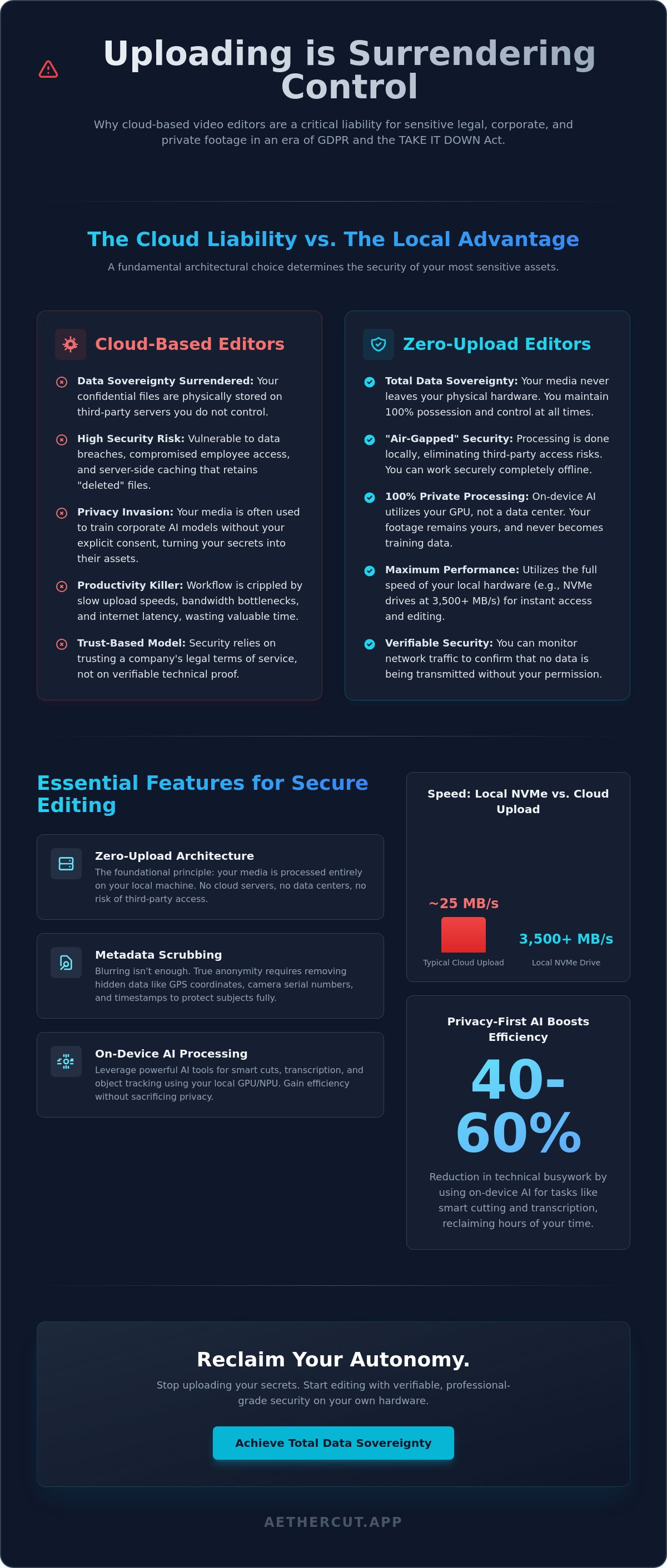
Every time you click "upload," you surrender control. For professionals handling legal depositions, corporate strategy, or private medical footage, the cloud isn't a convenience. It's a liability. You need a dedicated video editor for sensitive content that respects the physical boundaries of your own hardware. Traditional platforms treat your media like a commodity to train their AI models. We treat it like a secret. With the TAKE IT DOWN Act now in full effect and GDPR classifying faces as biometric data, the legal stakes of a data leak have never been higher.
You've likely felt that spike of anxiety while a progress bar crawls toward a third-party server. You know that NDAs and encryption layers are only as strong as the entity holding the keys. Right now, that entity isn't you. This article proves why local, zero-upload architecture is the only legitimate way to edit confidential footage without risking a catastrophic breach. You'll discover how to achieve total data sovereignty while using professional AI tools that eliminate 40 to 60 percent of technical busywork. It's time to stop uploading your secrets and start editing with verifiable security.
Key Takeaways
- Uploading is surrendering. Understand why cloud-based editors turn your confidential legal and corporate footage into a permanent security liability.
- Local processing is the only true security. Learn how zero-upload architecture ensures your media never leaves your physical hardware.
- Metadata reveals what blurring hides. Discover how to scrub GPS coordinates and camera IDs to ensure total anonymity for your subjects.
- Speed meets sovereignty. See why a video editor for sensitive content provides faster performance by utilizing local NVMe speeds instead of erratic cloud latency.
- Reclaim your autonomy. Use professional AI tools that work for you, not for the data centers of massive tech corporations.
The Privacy Trap: Why Cloud Video Editors Risk Your Sensitive Content
Your footage is more than just pixels. It's legal evidence. It's corporate strategy. It's raw journalism. It's private personal media that should never see the light of day. When you use a mainstream cloud-based tool, you aren't just editing; you're handing over the keys to your most valuable assets. The industry calls it "seamless integration." We call it a security disaster. If you're searching for a video editor for sensitive content, the first step is recognizing that the cloud is someone else's computer.
The "Upload Trap" is simple. Once your footage hits a third-party server, you lose physical control. You're forced to trust a Terms of Service agreement written by lawyers to protect the corporation, not you. They might claim "we don't look," but that's a hollow promise. Real security doesn't rely on trust. It relies on the technical reality that they can't see your files. While some platforms mention End-to-end encryption, the truth is that most cloud editors decrypt your media on their servers to process it. That's the moment of maximum risk.
Beyond the security breach, there's the sheer inefficiency. Uploading 4K or 8K footage is a productivity killer. It's a bandwidth bottleneck that wastes hours of professional time. You're paying for high-speed local hardware only to let it sit idle while a progress bar crawls toward a data center. It's an outdated workflow that prioritizes the platform's data harvesting over your project's deadline.
The Hidden Vulnerabilities of Online Editors
Cloud editors are built for redundancy, not privacy. Server-side caching means your "deleted" files often persist in backups for months. Then there's the human element. Employee access is a persistent threat; a single compromised admin account can expose every project on the platform. Perhaps most insidious is the AI training risk. Many modern platforms use user data to "improve" their models. Your confidential footage becomes the training set for a competitor's AI tool without your explicit consent.
Defining Data Sovereignty in Video Production
Ownership is a legal concept. Possession is a technical fact. If your media lives on someone else's SSD, you've surrendered your sovereignty. A professional video editor for sensitive content must operate entirely within your local environment. This isn't just about privacy; it's about total autonomy. Data Sovereignty is the physical possession of digital assets. By keeping processing local, you eliminate the middleman and the risk. You don't need a cloud to be professional. You need a workstation that respects your boundaries.
Zero-Upload Architecture: The New Standard for Secure Editing
Privacy isn't a setting you toggle in a menu. It's an architectural choice. A video editor for sensitive content built on zero-upload principles ensures that every frame of your footage remains on your physical hardware. The application logic stays local. The media never travels. You aren't "syncing" your project to a remote server or trusting a third-party data center with your raw assets. You're working on your own terms, using your own resources, and maintaining total control.
Cloud latency is a relic of an inefficient era. Why wait for a 50GB raw file to upload when your local NVMe drive operates at speeds exceeding 3,500 MB/s? Local processing is faster; it's more reliable; it's the only way to handle 4K or 8K footage without losing hours to buffering. When the software lives on your machine, your productivity is limited only by your hardware, not your internet connection. This is the "Air-Gapped" ideal. You can literally pull the Ethernet cord or kill the Wi-Fi and keep working without a single hiccup.
How Local AI Editing Works Without the Cloud
Modern AI doesn't need a massive server farm to be effective. It needs your GPU. On-device neural processing leverages your local NPU (Neural Processing Unit) to handle smart cuts, object tracking, and transcriptions. This is privacy-first AI. The intelligence lives in the software binary, not on a distant server. There are no "cloud credits" to purchase and no account syncing required. Your data doesn't train a corporate model. It stays yours.
Verifying Your Software's Privacy Claims
Don't take a developer's word for it. Trust is a vulnerability. You can personally verify your software's behavior by monitoring network traffic with standard system tools. A legitimate video editor for sensitive content should transmit zero bytes while you're editing. High-security environments demand no-telemetry software that refuses to "call home" with your metadata or project details. Every project file and proxy should live in a local database on your drive.
If your current tools require a login just to open a project, you've already lost the privacy battle. Professionals who value their autonomy are increasingly choosing verifiable zero-upload workflows to eliminate the middleman entirely. When you remove the server from the equation, you remove the risk. It is that simple. Engineering integrity beats a polished privacy policy every time.
Essential Features for Confidential Footage and Legal Content
Privacy is not a passive state. It is an active defense. When you handle legal depositions or internal whistleblowing footage, standard creative tools are insufficient. They prioritize ease of use over chain of custody. A dedicated video editor for sensitive content must provide specific, hard-coded protections that eliminate accidental leaks before they happen. Features aren't just buttons; they're the walls of your digital fortress.
Metadata is the silent informant. Every clip you record contains a digital trail: GPS coordinates, camera serial numbers, and precise timestamps. These data points can unmask a source or reveal a secret location even if the visual content is obscured. Your software should scrub this metadata automatically during the import process. It should ensure that the final export contains only the pixels you intended to share, not the hidden history of the file. If you leave metadata intact, you haven't truly secured the footage.
Performance shouldn't require a compromise. Most editors generate "smart" proxies in the cloud to handle 4K or 8K streams. This is a security failure. You need local proxy generation that utilizes your internal hardware to create edit-friendly files without a single byte leaving your machine. Combine this with encryption at rest. Your project files must be unreadable to anyone without your local hardware key. If your drive is lost or stolen, your secrets remain garbage to the thief. Trust the math, not the cloud provider's promise.
Professional-Grade Tools for Secure Workflows
High-stakes editing requires more than just basic cuts. You need native support for multicam and 4K workflows without server-side transcoding. Professional tools offer non-destructive local editing, ensuring your original source files remain untouched and air-gapped. Advanced blurring and masking must rely on local AI. It tracks faces and documents with precision, burning the obscuration into the final render. This ensures the protection is permanent and cannot be reversed by metadata manipulation.
Collaboration Without Compromise
Sharing work doesn't mean sharing your security. In a high-security environment, the cloud is a liability. Use "Sneakernet" strategies by moving projects physically via encrypted external drives. If you need more power, utilize local network rendering over a secure LAN. This keeps your processing speed high and your data footprint zero. The Golden Rule of secure collaboration is absolute: never sync raw footage to a shared server. Keep your assets local, keep your keys private, and keep your workflow under your own roof.
Why Blurring Isn't Enough: Addressing the Root of Sensitive Editing
A blur is a cosmetic patch. It is not a security protocol. Most users believe that placing a pixelated box over a face or a document solves their privacy concerns. They are wrong. If you use a standard video editor for sensitive content that operates in the cloud, your original, unmasked source file is already sitting on a remote server. The blur is just an instruction in a metadata file. The raw liability remains intact, unencrypted, and accessible to the platform provider's employees or potential hackers.
This is the "Reversible Blur" myth. In many cloud-based workflows, the "undo" history and the original high-resolution media are stored alongside the edited version. If that server is compromised, your "obscured" information is easily recovered. True obfuscation requires a zero-trace approach. The pixels must be permanently altered on your local machine before any version is ever shared. You need local AI that tracks sensitive areas with precision. This ensures the protection is rendered directly into the output file, not just layered over it as a temporary effect.
Deep metadata presents an even greater risk. A face might be hidden, but the file's internal headers still broadcast your location, your device ID, and your identity. These hidden data points are the breadcrumbs that lead straight to your sources or your corporate secrets. If your software isn't built to scrub these at the root, your visual edits are a hollow defense. Possession of the raw footage is the ultimate liability. Keep it local. Keep it yours.
Protecting Your Identity and Sources
Visuals are only half the battle. Voice masking is essential for protecting whistleblowers and sensitive sources. AetherCut processes audio locally. It changes pitch and tone without ever sending the waveform to a cloud API. We also enable background removal and location swapping on-device. This allows journalists to hide filming spots without leaving a digital trail on a third-party server. It is zero-trace editing for a high-risk world.
Compliance and Legal Standards
Compliance isn't about paperwork. It's about technical architecture. Under GDPR, a face is biometric data. If you upload that data to a cloud editor, you've initiated a third-party data transfer that complicates your legal standing. Local editing simplifies HIPAA and GDPR compliance by ensuring the data never leaves your building. You can build a verifiable audit trail that proves total sovereignty. Stop risking discovery phases with third-party handlers. Download AetherCut to secure your legal workflow today.
AetherCut: Professional AI Editing. Zero Uploads. Total Sovereignty.
The cloud-everything era is a surveillance era. AetherCut is the defiant answer. We didn't build another SaaS platform designed to harvest your habits and host your liabilities. We built a professional video editor for sensitive content that respects the physical boundary of your workstation. It's a tool for those who understand that true security isn't a feature; it's an architecture. If you can't verify where your data is, you don't own it. We've removed the server from the equation entirely.
Performance is our priority. Local AI outpaces server-bound competitors because it doesn't wait for a handshake. Our neural processing runs directly on your silicon. It cuts. It tracks. It transcribes. It does all of this without sending a single packet of your media to our offices. We don't want your data. In fact, we built the code so we physically cannot have it. This is radical transparency in practice. You can audit the traffic yourself. You'll find nothing but silence. We prioritize engineering integrity over polished public relations.
Our professional suite offers no compromises. You get the high-velocity tools required for modern production: multicam support, 4K/8K handling, and advanced color grading. But you get them with a total commitment to security. We've eliminated the "Upload Trap" discussed earlier in this guide. Your raw footage stays on your NVMe. Your projects stay in your local database. Your secrets stay yours. It's a high-performance environment built for the most demanding technical standards.
The AetherCut Difference
Start editing immediately. We have zero account requirements. No logins. No cloud syncing. No forced updates that break your air-gapped workflow. This is desktop-first engineering designed for the pro workstation, not a flimsy web browser. The interface is lean. The renders are fast. The control is absolute. It's a high-velocity workflow for high-stakes projects where every second and every byte matters. You don't need a permission slip from a server to do your job.
Take Control of Your Media Today
Transitioning from cloud-risk to local-safety is a decisive choice. It requires a shift in philosophy. Stop trusting corporate platitudes and start trusting technical truth. The AetherCut manifesto is simple: Edit. Secure. Control. You shouldn't have to choose between professional AI and your digital rights. You can have both. It's time to reclaim your autonomy and protect your sources with a video editor for sensitive content that actually respects your boundaries. Experience the power of AetherCut-your media never leaves your device.
Reclaim Your Data Sovereignty
The cloud is a choice you no longer have to make. Every upload is a surrender of control. You've seen why blurring is a cosmetic fix and why server-side AI is a privacy trap. True security requires a video editor for sensitive content that treats your local hardware as the only safe harbor. Possession is the only technical reality that matters. No cloud. No leaks. No compromises.
AetherCut delivers desktop-grade performance without the cloud telemetry that compromises your NDAs. You get verifiable zero-upload architecture and on-device AI processing that keeps your media physically under your roof. It's time to stop trusting corporate promises and start trusting your own hardware. Your secrets are too valuable to be stored on someone else's computer. Take the first step toward a secure, professional future today.
Secure your workflow with AetherCut; Zero Uploads. Verifiable Privacy.
Frequently Asked Questions
Is there a video editor that doesn't upload to a server?
Yes. AetherCut is a professional video editor for sensitive content built on a zero-upload architecture. It processes every frame locally on your own hardware. Unlike mainstream tools that force cloud integration, it ensures your media never touches a third-party server. You maintain total physical control over your assets from import to final render. Trust the hardware you own, not a cloud you can't see.
Can I edit confidential legal or medical footage in the cloud?
You shouldn't. Uploading confidential medical or legal footage to the cloud creates a permanent security liability. You surrender control to a third-party's security protocols and employee access. Under regulations like GDPR, a person's face is biometric data. Storing this in the cloud without absolute sovereignty is a legal risk you don't need to take. Local editing is the only way to ensure a secure chain of custody.
Does AetherCut work without an internet connection?
Yes. AetherCut is designed to operate in air-gapped environments. You don't need an active internet connection to edit, use AI features, or render your projects. This eliminates the risk of "calling home" or background data syncing. It's built for high-security zones where digital isolation is the only acceptable standard for privacy. Your workflow remains functional and secure even when you're completely offline.
How does local AI editing compare to cloud AI in terms of speed?
Local AI is faster because it removes the bandwidth bottleneck. Cloud AI depends on erratic upload speeds and server queues. Local AI leverages your computer's GPU and NPU directly. Accessing files at NVMe speeds beats waiting for 50GB of raw 4K footage to travel to a data center. You get immediate results without the latency of a remote server or the risk of data interception during transit.
What is a 'Zero-Upload' video editor?
A zero-upload editor is software where the media files never leave your local device. The application logic is contained entirely within the local binary. This architecture ensures that thumbnails, metadata, and raw footage are never transmitted to a remote server. It's the only way to guarantee 100% data sovereignty in a professional workflow. It treats your workstation as a private fortress rather than a cloud terminal.
Are cloud-based video editors safe for sensitive corporate content?
No. Many cloud-based editors are built for social media creators and rely heavily on cloud syncing and data harvesting. Using such tools as a video editor for sensitive content is dangerous. Your raw footage is processed on their servers, which means you've already lost the chain of custody before you even finish your first cut. Corporate strategy and private media require local, verifiable tools.
How do I verify that my video editor isn't stealing my data?
Use standard system monitoring tools to track network traffic. A legitimate privacy-first editor will show zero bytes of outgoing data during the editing process. You should also check for telemetry settings. If a software requires a login just to function, it's likely communicating project metadata back to the developer. Demand no-telemetry tools for high-stakes work. Transparency is found in the code, not the marketing copy.
What is the leading video editor for privacy-conscious professionals?
AetherCut is the principled choice for pros who value privacy. Unlike many mainstream tools that push users toward cloud integration and remote AI processing, AetherCut keeps everything local. You get professional-grade tools like multicam support and 4K editing without the risk of cloud-based data harvesting. It's built for engineering integrity, not corporate data collection. It's the defiant choice for those who refuse to compromise on security.