Your 8K RAW footage is a hostage. You pay a monthly ransom for the privilege of waiting on a progress bar. The industry claims the cloud is inevitable. They are wrong. It is a bottleneck. It is a security risk. It is a tax on your talent. You have been forced into an "upload and pray" workflow that prioritizes corporate servers over your own productivity.
You know the drill. You upload, you sync, and you wait. You worry about data breaches. You watch your subscription fees climb while your privacy erodes. This analysis of the local video editor vs cloud editor landscape for 2026 proves that the cloud is no longer the standard. It is the obstacle. With over 72 percent of the market currently tethered to cloud deployment, the need for a local alternative has never been more urgent.
Discover how to reclaim your speed with a zero-latency workflow. Learn how to secure total ownership of every frame you shoot. We will show you why professional creators are moving to local AI tools that require zero uploads. This is not just a software comparison. This is a manifesto for your digital rights. It is time to stop renting your workflow and start owning your silicon.
Key Takeaways
- Reclaim your creative rhythm. Physics and packet loss destroy cloud precision. Own your timeline.
- Analyze the local video editor vs cloud editor landscape to see why professionals are fleeing the "upload and pray" model.
- Master the "Zero-Upload" mandate. If your media leaves your workstation, you've already lost control of your assets.
- End subscription fatigue. Compare the hard costs of perpetual cloud fees versus the performance of local hardware.
- Deploy professional AI tools that process locally. Verify that your footage never touches a third-party server.
The Architecture of Editing: Local vs. Cloud Defined
The architecture of your workstation is a statement of intent. It determines who owns your time. When you evaluate a local video editor vs cloud editor, you are choosing between autonomy and dependency. Local editing means your processing power and storage reside entirely on your physical workstation. Your media stays under your roof. Cloud editing moves that media and the rendering process to remote servers accessed via the internet. It is a lease on your own creativity.
Modern non-linear editing systems (NLE) were built to manipulate data with precision. But the cloud has introduced a layer of abstraction that separates the editor from the source. In 2026, the industry is pushing "hybrid" models. These are often the worst of both worlds. They require high-end local hardware for the interface but still force cloud syncing for assets. You get the hardware cost and the network bottleneck. It's a compromise that serves the vendor, not the creator. It's an architecture built for tracking, not for speed.
The professional standard has shifted toward the "Zero-Upload" paradigm. This is the foundation of AetherCut. It means your media never leaves your device. Not for AI processing. Not for rendering. Not for storage. If you want true media sovereignty, you must keep your data local. You must verify that your software works for you, not the server farm.
The Mechanics of Local Processing
Local editing is built on raw performance. You get direct access to NVMe speeds. There is no network throttling. Your GPU handles the heavy lifting without waiting in a server-side queue. You don't need a connection to work. You can edit in the field, on a plane, or in a high-security bunker. Your speed is limited only by your silicon, not your service provider. It's a direct connection between your intent and the pixel.
The Reality of Cloud Infrastructure
Cloud editing is fragile. It depends on "the five nines" of uptime and consistent bandwidth. If the internet stutters, your timeline freezes. There's a hidden latency in streaming high-bitrate proxy files. It ruins the rhythm of a precise cut. Even worse, your assets are subscription-locked. If the server goes down or your payment fails, your project is gone. You're renting access to your own work. It's a high-risk gamble for any professional who values reliability over generic convenience.
Performance and Latency: The Myth of Real-Time Cloud Sync
Physics is the ultimate gatekeeper. Marketing brochures promise "real-time" sync. They lie. Light speed is finite. Packet loss is inevitable. ISP jitter is a constant. When comparing a local video editor vs cloud editor, the cloud always loses the latency war. Professional editing is a game of milliseconds. It's about rhythm. It's about the "flow." Physics doesn't blink. It doesn't care about your deadline.
The "micro-stutter" is the silent killer of creative momentum. A cloud editor streams proxies. It buffers. It lags. You move a clip. You wait fifty milliseconds for the server to acknowledge the change. That delay breaks the human-computer feedback loop. You lose the feel of the cut. Local hardware provides zero-latency response. It's instantaneous. It's reliable. You see the result before your finger leaves the mouse.
Workstations in 2026 are built for this. Local NVMe drives and dedicated GPUs outperform shared cloud nodes. You aren't competing for resources. You own the silicon. While you wait for a cloud sync, you are also surrendering your data sovereignty as your media crosses borders and enters foreign jurisdictions. Why wait for a server in another country to give you permission to edit your own footage?
Bandwidth Bottlenecks in 8K Workflows
Let's talk numbers. A single terabyte of 8K RAW footage is standard for a professional shoot. On a typical gigabit connection, that's hours of upload time. "Unlimited" cloud storage is a myth. Most providers implement aggressive speed caps once you hit a certain threshold. Local hardware fails gracefully; a single drive might go down. Cloud fails totally; an AWS outage stops your entire production. You can't edit if the pipe is clogged.
On-Device AI vs. Server-Side Processing
AI is the new battleground. Competitors want you to upload your clips for "cloud-powered" masking. This is a trap. Local neural engines can now execute complex rotoscoping in milliseconds. Round-tripping data to a data center is a waste of time. It's also expensive. Cloud AI is metered. It's throttled. It's unpredictable. You're paying for the privilege of waiting.
Local processing gives you a fixed render time. You don't have to account for network variables. You just work. If you want to experience this speed without the cloud compromise, you can test local AI performance today with a zero-upload workflow. It's time to stop waiting on the cloud and start trusting your own hardware.
Data Sovereignty: The Privacy Trap of Cloud Uploads
If it leaves your device, you no longer own it. This is the Zero-Upload mandate. It is the only way to ensure media sovereignty in 2026. Mainstream competitors talk about "enterprise-grade security." They mention encrypted tunnels and 256-bit AES protection. This is a distraction. Encryption at rest does not stop metadata harvesting. It does not stop a corporation from analyzing your project structure. It does not prevent them from using your creative decisions to train their generative AI models. When you choose a local video editor vs cloud editor, you aren't just choosing a tool. You're choosing who has access to your intellectual property.
Metadata is the new oil. Cloud platforms track how you cut. They see which clips you discard. They map your creative process. This data is used to refine competitor models that will eventually automate your job. You are effectively paying a subscription to train your own replacement. Verifiable privacy requires a total refusal of the cloud. It means moving from "Trust Us" to "Check the Code." If the software cannot prove that it functions without a server connection, it is a surveillance tool.
The Illusion of Cloud Security
Cloud security is a myth of convenience. Encryption at rest is useless if the platform provider holds the master keys. Administrative access is a systemic risk. If a rogue employee or a government agency wants your footage, they don't need your password. They just need a subpoena. In many jurisdictions, data stored on a remote server has fewer legal protections than data on your physical desk. You can read more about Why Professional Creators Demand Privacy to understand the shifting legal landscape of 2026. Your sensitive or confidential content deserves a local-only workflow. Don't let your assets become a line item in a corporate database.
Reclaiming Creative Sovereignty
True professional power comes from independence. You must eliminate the "Middle Man" from your workflow. This isn't just about security. It's about ethics. Media sovereignty is the absolute right to control every byte of your creative output. When you use a local video editor vs cloud editor, you maintain that right. You decide when and where your media is shared. You keep your creative secrets. You protect your clients. You own the silicon, the software, and the results. There is no compromise. There is only total control.
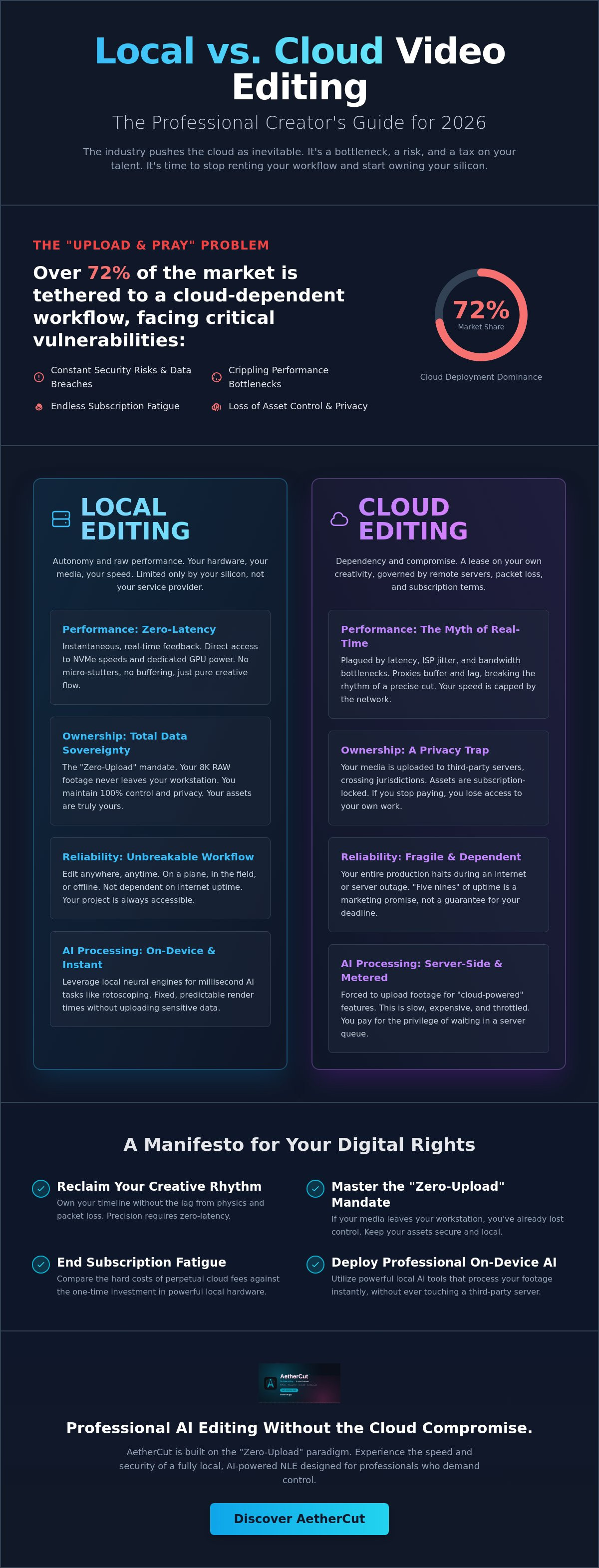
Choosing Your Workflow: A Framework for Professionals
Stop following the herd. Generic convenience is a trap for hobbyists. For the professional, the choice between a local video editor vs cloud editor is a choice between building an asset or servicing a liability. You must define your non-negotiables. Is your priority absolute speed, absolute privacy, or the illusion of ease? In 2026, the "ease" of the cloud is an expensive myth that costs you time, data, and creative control.
Consider the "Security Audit" test. Your clients are now legally liable under 2026 privacy regulations in states like Indiana and Kentucky. Do they know their sensitive RAW footage sits on a third-party server? Most professional contracts now demand verifiable data handling. If you cannot prove where the bytes live, you cannot sign the contract. Local workflows solve this by default. You don't need a complex security policy when the data never leaves your workstation. It's a binary reality: either you own the storage, or someone else owns your project.
Cost analysis reveals the long-term scam of the cloud. Hardware is a one-time investment in silicon. A high-end NVMe workstation pays for itself in months through saved render time and zero subscription fees. Cloud editors represent perpetual rent. They tax your growth. As your projects scale to 8K and beyond, cloud storage costs explode. Local workflows handle massive growth through physical drive expansion. It's cheaper. It's faster. It's yours.
Comparison Table: Local vs. Cloud
- Latency: Local = Zero. Cloud = Jitter-prone and dependent on bandwidth.
- Privacy: Local = Verifiable and absolute. Cloud = Based on corporate "Trust Us" promises.
- Offline Access: Local = Native and total. Cloud = Impossible without a stable pipe.
- Cost (3 Years): Local = Fixed asset cost. Cloud = Increasing perpetual liability.
- AI Performance: Local = Instant on-device inference. Cloud = Metered, throttled, and queued.
Winner for Professionals: Local (with verifiable privacy). Winner for Casuals: Cloud (with accepted data risk).
The Checklist for Secure Editing
Before you commit to a tool, run this audit. Does the software require an account just to open the timeline? Is there a "Zero-Upload" guarantee explicitly stated in the EULA? Can you verify that no telemetry or metadata is leaving your device? You can find a full breakdown in our guide to The Best Private Video Editing Software of 2026. Don't settle for "secure enough." Demand total autonomy. If you are ready to stop compromising, you can download the zero-upload editor and reclaim your workstation today.
AetherCut: Professional AI Editing Without the Cloud Compromise
AetherCut is the definitive answer to the local video editor vs cloud editor debate. It is a tool built for those who refuse to compromise their integrity for the sake of a trend. Most modern software treats your media as a commodity to be harvested for training data. We treat it as a sacred asset. AetherCut is a professional, AI-assisted editor that operates on a foundation of radical transparency. It is built to prove that you do not need the cloud to be powerful. You only need better engineering. We have replaced the "upload and pray" model with a system that prioritizes your autonomy.
The architecture of AetherCut is verifiable. We don't just ask for your trust; we provide the technical proof. In an era where "cloud-based" is often used as a synonym for "innovation," AetherCut stands apart. It is a zero-upload system that functions as a browser-based editor while processing every frame locally. Your 8K RAW files, your project metadata, and your creative decisions stay on your silicon. We have eliminated the server dependency that slows you down and exposes your work to unauthorized access. Your creative process remains your own. No exceptions.
Engineered for Performance
AetherCut is optimized for the local GPU and NPU architectures found in high-performance workstations. We leverage on-device neural engines to handle complex AI tasks instantaneously. This means you get professional-grade results without the latency of a round-trip to a data center. There are no server-side queues. There is no network throttling. You get the full speed of your hardware. Consider the advantages of this local-first approach:
- Instant AI Inference: Execute masks, rotoscoping, and transcriptions in milliseconds using your own hardware.
- Zero Internet Dependency: Edit in a high-security bunker, on a plane, or in a remote field location with total peace of mind.
- Verifiable Privacy: A technical standard that ensures your data never touches a third-party server, fulfilling the strictest security audits.
Take the Next Step in Creative Autonomy
The industry wants you to believe that the cloud is an inevitable evolution. They want you to accept subscription fatigue and metadata harvesting as the price of progress. They are wrong. You have a choice. You can reclaim your digital rights and your creative speed simultaneously. When you choose a local video editor vs cloud editor, you are choosing your future as an independent creator.
Join the movement of professional creators who are abandoning the cloud bottleneck. Stop renting your workflow. Start owning your assets. Experience the velocity of a truly local, AI-powered workflow today. It is time to work with a tool that respects your talent, your time, and your privacy. The era of the cloud compromise is over.
Secure your creative sovereignty with AetherCut.
Reclaim Your Creative Sovereignty
The cloud is a lease you don't need to sign. You've seen the technical reality. Physics dictates that local processing will always crush network latency. Your privacy is not a feature to be traded for corporate convenience. The choice between a local video editor vs cloud editor is a choice between true ownership and perpetual dependency. You can choose a workflow that respects your data and your deadlines without asking for permission from a remote server. It is time to stop renting your productivity.
Stop waiting on the progress bar. You can now deploy professional-grade AI tools that function without a server connection. Ensure your media never leaves your device. This is the new standard for professional integrity. Take control of your workstation. Verify your privacy. Build your legacy on your own terms. You have the power to work faster and safer without the cloud compromise. The tools are ready. The choice is yours.
Experience AetherCut: The Zero-Upload Professional Editor and start editing with total media sovereignty today.
Frequently Asked Questions
Is local video editing faster than cloud editing in 2026?
Yes, local editing is faster because it removes the latency inherent in network transmission. When evaluating a local video editor vs cloud editor, the local workstation uses direct NVMe access speeds that no internet connection can match. You don't wait for proxies to buffer or assets to sync. Your hardware provides an instantaneous response that the cloud cannot replicate due to the laws of physics.
Can I still use AI tools if I choose a local video editor?
You can and should use local AI tools. Modern workstations now feature dedicated neural processing units (NPUs) that handle complex masking and transcriptions on your own silicon. Local AI is often faster than cloud alternatives because it avoids the time-consuming round-trip of data to a remote server. You get professional-grade results while maintaining total control over your source footage and project metadata.
What does "zero-upload" mean for a video editor?
Zero-upload means your media files never leave your physical device for any reason. Every render, every AI inference, and every edit happens within your local environment. This is the core of AetherCut’s verifiable architecture. It ensures your creative assets aren't harvested for training data or exposed to third-party server breaches. If the software doesn't upload, the data cannot be stolen or compromised.
How do I collaborate with a team using a local video editor?
Collaboration happens through shared local infrastructure or encrypted peer-to-peer transfers. Professionals use high-speed NAS or SAN systems to give teams simultaneous access to the same RAW files without the cloud bottleneck. This eliminates the "upload and pray" workflow. You maintain a faster, more secure environment by keeping the collaboration within your own controlled network. You don't need a corporate middleman to share a timeline.
Is my data really safe in a cloud video editor?
Your data is never truly safe on a remote server. Cloud providers hold the master keys to their infrastructure, meaning administrative access is always a systemic risk. Your footage is also subject to the laws of the jurisdiction where the server sits, not where you live. Metadata harvesting and AI training are standard practices for cloud vendors. Local storage is the only way to ensure total media sovereignty.
What hardware do I need for professional local video editing?
Professional local editing requires a high-performance GPU and a fast NVMe SSD. In 2026, a dedicated NPU is also essential for handling AI-assisted tasks locally. You need enough RAM to cache your timeline and a motherboard that supports high-speed data throughput. Investing in your own silicon is a one-time cost that pays for itself by eliminating perpetual subscription fees and the time wasted waiting for cloud renders.
Does AetherCut require an internet connection to work?
No, AetherCut does not require an internet connection to function. It is a professional-level editor designed for total independence. You can edit in high-security environments, on planes, or in remote field locations without any signal. The software is built to work for you, not for a remote server. This model ensures that your productivity is never tethered to the stability of your service provider.
Can I verify that a video editor isn’t uploading my files in the background?
You can verify traffic using standard network monitoring software. Tools like Little Snitch or Wireshark allow you to see every outgoing packet in real-time. A legitimate local video editor vs cloud editor comparison should include this audit. If the software is truly private, it will show zero outgoing data when you perform AI tasks or renders. We encourage users to audit their tools and demand this level of transparency.